
Initial data gathering and pre-processing
Pricing data is scraped from a variety of sources including the facility websites (e.g. publicstorage.com/) and pricing aggregators (e.g. sparefoot.com) each day. Each time a “price” is scraped, it’s sorted as either a “street rate” (non-discounted price) and “web rate” (discounted price).
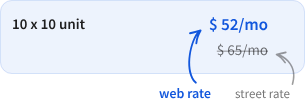
If there is only one price as shown below, this is used as both the “web” and “street” rate as there is no discounting.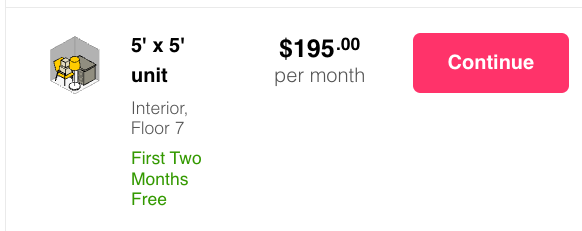
The prices are then analyzed to determine the size of the unit. At TractIQ, we sort things into:
- 5x5
- 5x10
- 10x10
- 10x15
- 10x20
- 10x30
- Other for all non-standard unit sizes
- Note: we currently filter out all non-standard unit sizes and do not offer these in the application.
Further tagging is applied to indicate whether or not the unit includes the following amenities:
- Climate control
- Ground/first floor
- Elevator access
- Drive up access
Aggregation and insertion into the application
After each price is scraped and processed on each day, it is averaged with all other “matching” prices at that facility for that month to create the value that’s shown in TractIQ when looking at a particular month.
So, for instance, assume we are looking only at Facility A.
Facility A may have prices on their website and on sparefoot. For a particular “unit,” say 10x10 CC units with first floor access and no elevator access and no drive up access, we will have scraped many prices. There could be 60 prices if one unit was available on both websites every day of the month. There could also be more than 60 scraped prices, however, because sometimes there are multiple prices for the same “type” of unit depending how far they are from the elevator or the facility manager’s perception that there are “more premium” units than others.
Source Rate Data
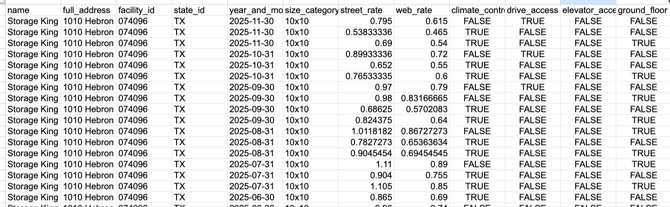
Source rental rate data (available on the Pro+ plan) is the rawest version of the data that we make available. This means the prices are aggregated as described above and the average monthly price for every standard unit size is made available. When exported, this data will go back as long as pricing history is available for that facility (as early as 2018 for many facilities).
An example of this data is below.
Pricing data in TractIQ application and Rental Comps Export
The source data shown above is difficult to navigate because of the sheer volume and granularity of the data. For example, a 5 mile source rate data file in Austin is ~18,000 rows as of publishing (and this length grows with every additional month). To make this easier for our users, TractIQ’s application will do significant analysis on the monthly data.
The below will attempt to explain exactly how various data is aggregated in the application. If you do have access to the Source Data file, you can reverse engineer any of the analysis/summarization of rates in TractIQ. To make it easier, we have also provided an example of how to reverse engineer these summarizations here.
In going through, we will use the same configuration as the linked example above.
Customization
Any rental comps analysis in TractIQ requires some level of “customization.” This is essentially determining what data will be brought into the analysis and how it will be aggregated. In this example, we’re looking at 10x10 CC street rate units (per month and per square foot) for the last 12 months.

Rental Comps (in app and first sheet in “Rental Comps” data export)
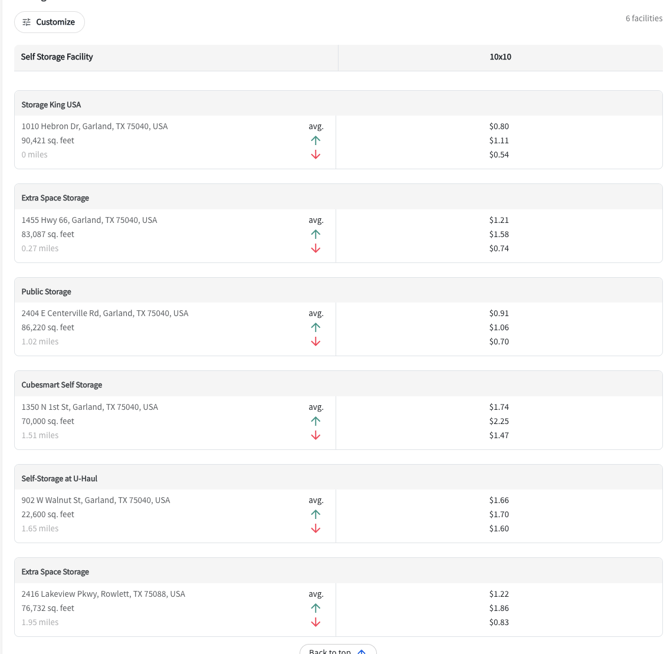
The data shown in the application will match the data in the first sheet of the “Rental Comps” data export.
The way this is aggregated (assuming customize settings above) is:
- For “Average” rows, this is the average of all the values (from Source Data) that meet the criteria you have set. Using the example above of 10x10 CC units, that means we take all the street rates from the last 12 months that are climate control (whether or not they are ground floor, have elevator access, or drive up access) and create a single average value.
- For “Maximum” (green arrow) and “Minimum” (red arrow), we are taking the Max or Min value from all of those units from the last 12 months.
Historical Rate Trends
To help with longitudinal (time series) analysis, we also include the “Hist. Rate Trends” tab in the Rental Comps export. This data is calculated as follows
- Each month will show an Average, Minimum, and Maximum. This is the Avg, Min, or Max of all of the values that meet the set criteria in source rent data for that facility for that month
- 12-Month Market Average will show the average from each month over the last year
