
Accessing Rental Comps
To view rental comps for a market:
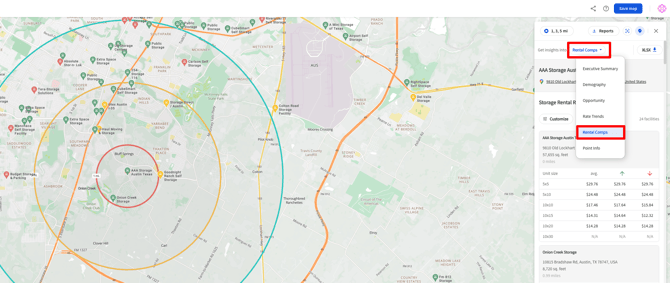
- Drop a pin, type in an address, or select a facility from the map.
- In the Insight Panel, open the dropdown under Executive Summary.
- Select Rental Comps to instantly see trailing 12-month rental rates for nearby facilities.
Customizing Your Analysis
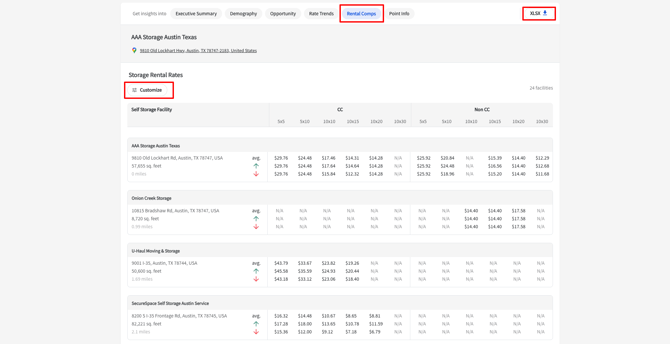
TractIQ allows you to tailor comps so you see the exact metrics you need.
Options include:
- Radius length – define your trade area.
- Rate type – per month, per year, or per square foot.
- Rate source – street vs. web pricing.
- Time period – last month or last 12 months.
- Unit selection – filter by the unit sizes that matter most (e.g., 5x10, 10x10, 10x20).
- Comparison type – climate vs. non-climate, ground floor vs. upper level, drive-up, or elevator access.
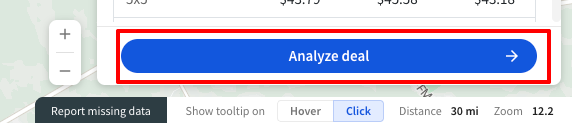
Once applied, your preferences will carry across sessions until you reset them. To view rental comps information in a more dedicated page, click Analyze Deal
Exporting Data
You can export rental comps directly into Excel for deeper analysis. The export includes:
- Customization Details – a summary of the filters/settings you applied.
- Rental Comps Tab – average, minimum, and maximum prices for each comp; facility name, address, square footage, distance, and pricing data.
- Historic Rate Trends Tab – monthly averages, min/max, and 12-month trends for your trade area.
This gives you both snapshot comps and historical pricing patterns to validate your underwriting and compare subject sites against market averages.
Aggregation
To learn more about how our rate gathering and processing works; please reference our Aggregation Article
Why It Matters
Rental Comps help you:
- Understand competitive pricing in your target market.
- Identify rent premiums or discounts for unit types, sizes, and features.
- Track historical pricing trends and seasonality.
- Export defensible data for investment presentations or underwriting models.
By customizing comps and exporting detailed reports, you can move faster and make confident, data-driven investment decisions.