
The Operating Performance tab within the Insight panel provides access to verified facility-level and market-level operating data for thousands of self-storage facilities. This includes both physical occupancy trends and detailed financial performance metrics for storage facilities with CMBS loans.
This data is available through TractIQ’s partnership with CredIQ, and access requires a Pro+ subscription.
How to Access the Operating Performance Tab
- Navigate to the map view in TractIQ.
- Drop a center pin on your desired market, address, or facility.
- Open the Insight panel on the right-hand side of the screen.
- Click the dropdown menu and select Operating Performance.
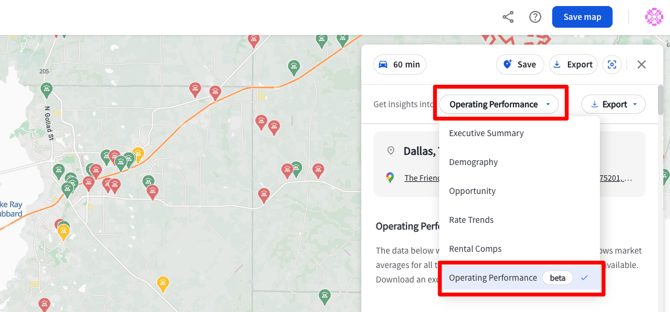
Market & Facility Level Occupancy Trends
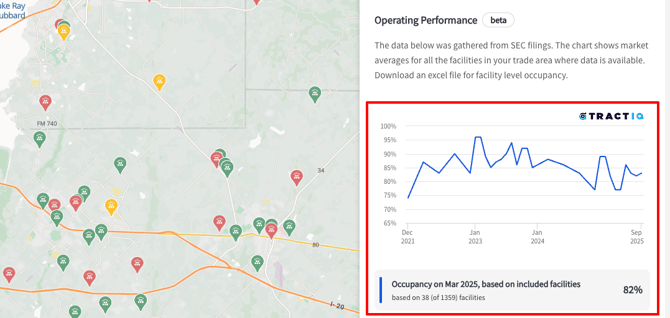
Once selected, the Operating Performance tab displays a market-level physical occupancy trend chart.
What the chart shows:
- Monthly physical occupancy averages for the selected market by month
- Historical data going back several years (availability varies by market)
- The number of facilities included in each month’s calculation
You can click on any month in the chart to view the corresponding occupancy details.
Facilities Included Table
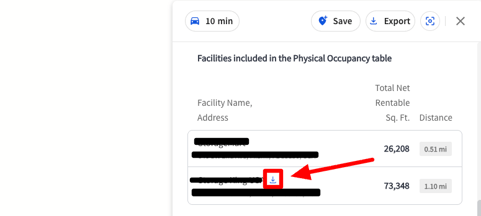
Below the occupancy trend chart, you’ll find a table listing the facilities included in the market data.
Facility details include:
- Facility name
- Facility address
- Total net rentable square footage
- Distance from the selected center pin
This table helps you understand exactly which facilities are contributing to the market-level averages.
Exporting Occupancy Data
You can export the raw occupancy data directly from the chart.
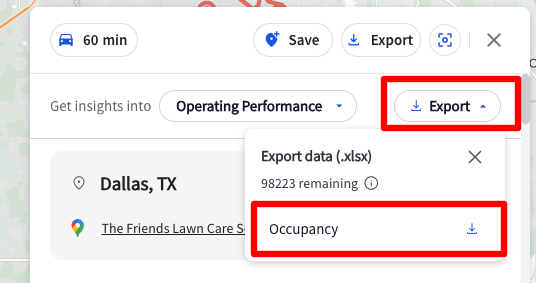
To export:
- Click the Export button in the top-right corner of the occupancy chart.
- Download the data file containing raw occupancy data.
The exported file includes:
- Facility ID
- Facility name
- Facility address
- Reporting month
- Physical occupancy values
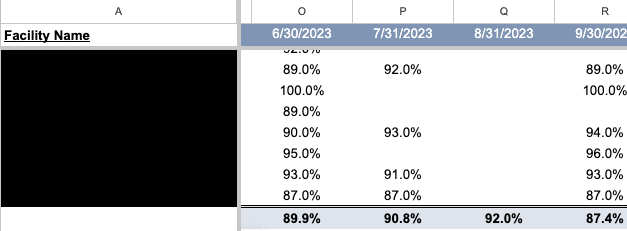
Pivot Table Tool
TractIQ also provides a pivot table tool (linked here) that allows you to:
- View each facility individually by name and address
- Analyze occupancy by month across columns
- See a market average summarized at the bottom of the table
To view the full workflow for accessing facility and market occupancy; watch the below video:
Facility-Level Financial Performance
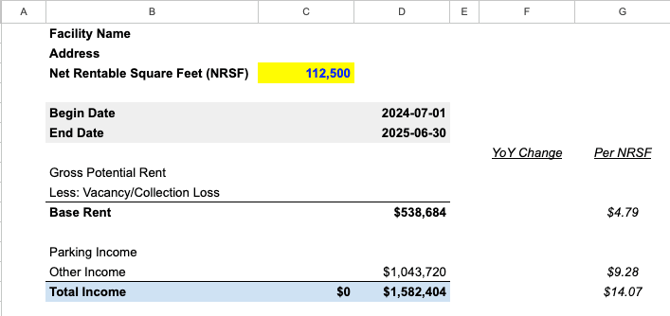
In addition to occupancy data, the Operating Performance tab provides access to facility-level financials for thousands of facilities within TractIQ.
How to access financials:
- In the Facilities Included table, click the blue download icon next to a facility name.
Financial data includes:
- Reporting start and end dates
- Base rent and total income
- Real estate taxes
- Property insurance
- Utilities
- Repairs and maintenance
- Management fees
- Payroll and benefits
- Advertising and marketing
- General and administrative expenses
- Capital expenditures (CapEx)
Financial Analysis via Pivot Table
Similar to occupancy data, TractIQ provides a pivot table for financial performance analysis.
Using this tool, you can:
- Calculate achieved rent per occupied net rentable square foot
- View a complete income statement-style breakdown
- Analyze operating expenses and Net Operating Income (NOI)
- Review NOI margin and operating expense (OpEx) ratio
To view the full workflow for accessing Financial Summaries, view the below video:
Have questions? Feel free to ask our team, or reference the FAQ Article dedicated to our operating performance (CMBS) data.
Access & Support
If the Operating Performance tab is new to you or you’re interested in enabling access, please reach out to the TractIQ team. We’re happy to answer questions and discuss how to activate this feature for your team!