
Featured Update:
Operating Performance & the launch of Pro+
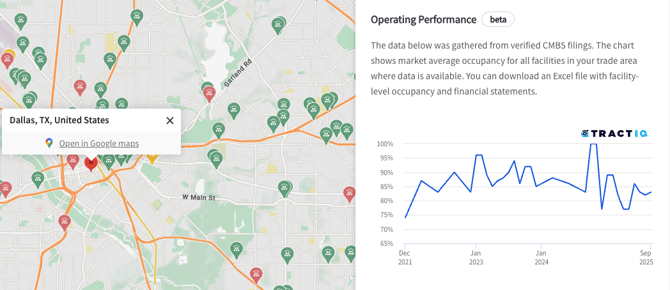
We’ve launched Operating Performance, giving users access to verified occupancy and financial performance data for facilities in their trade area.
What’s Included
- Occupancy charts
- Financial performance data
- Financial and occupancy data exports
- API access (API keys require additional configuration)
- Source rate data
To get a live demo; please schedule time with us here
Operating Performance Enhancements:
Financial Summary Export Tweaks
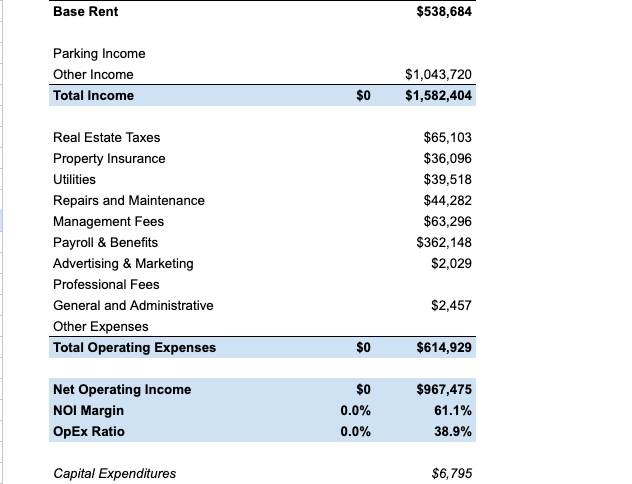
We added additional data fields to the financial summary exports. See which new fields are now present below, including a sample export of what the download will contain:
- Added a second, formatted sheet to financial exports
- Financials are now grouped into:
- Revenue
- Operating Expenses
- Capital Expenditures
- Added calculated fields:
- Total Income
- Total OpEx
- NOI
- NOI Margin
- OpEx Ratio
Facility Table Improvements
- Facility list now only includes facilities with CMBS data
- Made adjustments so users can easily see which facilities have CMBS data (occupancy & financials) within the Operating Performance page
- Facilities are grouped and ordered by:
- Occupancy availability for the current month
- Distance from the center pin
- Visual indicators:
- Facilities with occupancy data appear in white
- Facilities without occupancy (but with financials) appear in gray
- Occupancy for the current month is shown directly in the table when available
Deal Management & Analyze Deal:
Inline Deal Editing
- Users can now edit deals (e.g. change status, move lists, or add notes) directly from the full-screen Analyze Deal view.
Prospecting Improvements:
Improved First-Time List Creation
- When saving your first prospect list, you'll now be automatically directed to create a new list. We've also added more visible alerts when adding deals will exceed your maximum allowed list length or a list title is too short to save such as:
- Clear error messaging added when list titles are fewer than 3 characters
- Clear error message added when list size increases 150 addresses
Remove Duplicates
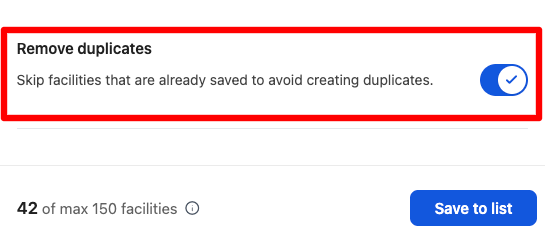
A new Prospecting tool filter allows users to exclude any facilities that already exist in any deal.
- This allows users to easily avoid adding in duplicate addresses/sites into separate lists within the dashboard. Makes prospecting even more powerful, easy, and automated without having the need to go back and ensure you don’t have duplicate facilities appearing within Prospecting tool results.
List Overview Data Export
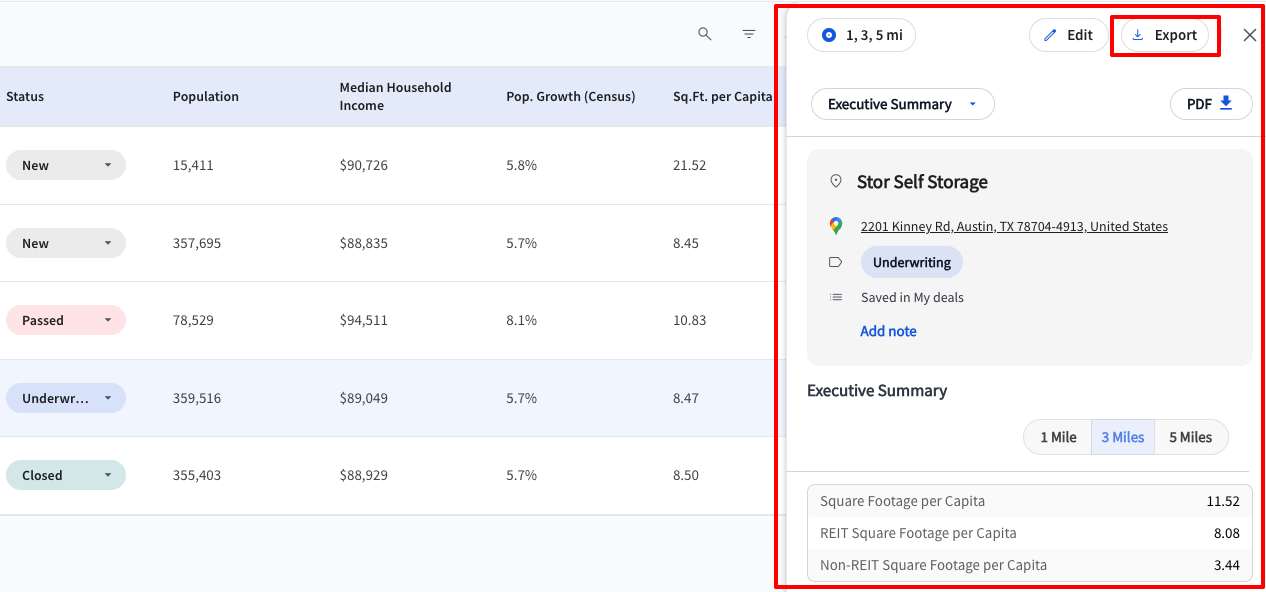
- Dashboard list exports now include the analysis currently visible in the table for all deals in the list. This means you can now do a full facility and area analysis directly in the dashboard itself within having to navigate to the map view.
Data Updates:
Demographics
- Updated EASI demographic data to 2025 current values and 2030 projections
- Current metrics now reference 2025
Projections now reference 2030
- Current metrics now reference 2025
New, Updated, and Removed Development Sites:
|
New Developments |
Updated Developments |
Removed Developments |
|
4 |
5 |
386 |
New, Updated, and Removed Facility Count:
|
New Facilities |
Updated Facilities |
Removed Facilities |
|
84 |
706 |
41 |
TractIQ Talent Search:
We are growing the team and would love your help. If you know someone who would be a great fit for our open Account Executive role or Investment Relations Manager roles, please send them to our careers page or have them email us directly.
Bug Fixes
- Facility tooltip now closes correctly when searching for a new market
- Fixed encoding issues causing special characters in facility names
- Fixed multiple bugs related to adding and editing deals and notes
- Enabled occupancy charts and exports when only one facility in a trade area has occupancy
- Enabled housing data exports for Pro and Pro+ users from the dashboard
- Enabled financial data downloads even when facilities do not have occupancy data for a given month
- Fixed Executive Summary annual growth rate calculation in PDF reports
- Fixed Rental Comps dropdown cutoff issue
- Improved real-time deal updates when editing from the Analyze Deal page