
This article will walk you through the following:
- How to access TractIQ Layers
- Using the Default Layers
- A robust list of key additional layers with definitions and update frequency
How to Access and use TractIQ Layers:
To access TractIQ’s legend, you can click on the “Layers” button.
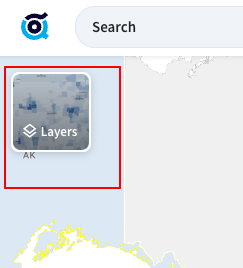
The legend includes several layers that are included by default for all users however, depending on your subscription tier, there are varying amounts of details you can extract from the layer.
To turn a layer on or off from your legend click the eye button.
To get additional information or view the key, click the info icon.

To access the full layer library, simply open TractIQ’s legend and click the book icon in the top right. This feature is only accessible for Pro users.

This will open up the full library. From here you can browse through or use your browser search (Mac: Command + F | Windows: Control + F) and search for a layer you’d like to add. Then click the + button and then the “Add” button will become clickable to add the layer (or multiple layers) to your legend.
If you have added several layers to your legend, we suggest saving the map in the top right so you can always go back to the map with all your desired layers included. You can also specify different maps for different views. For instance a risk map with flood zones, wildfire hazard, and seismic risk could be saved separately from a demand indicator map that has signal brands, health-oriented layers (e.g. nursing homes, childcare, hospital, etc.), military installations, and educational institution layers (e.g. School Digger, Colleges and Universities Campuses, etc)
Default Layers
When you open the map, a few key layers are turned on by default. These are chosen to give you immediate context and help you quickly assess an area:
|
Title |
Description |
Source |
|
Self Storage Units |
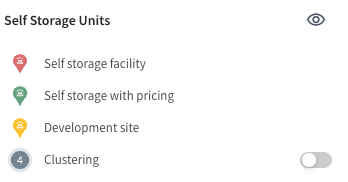
Operating and under-development self storage facilities. These are sourced by various scraping techniques as well as manual review from many different websites. Users also contribute to this dataset by flagging when they are putting new developments into the pipeline or if they acquire new storage. This data is updated weekly. The pin color denotes some key characteristics of the facility.
This is the only layer that can be clustered for convenience if you’re trying to get a general overview of a market with many facilities. You can turn it on and off using the toggle next to clustering.
|
Webscraping, manual reviews, and human submissions. |
|
Traffic count |
AADT (Average Annual Daily Traffic) shows the average number of vehicles that pass a specific location each day, based on traffic counts collected over an entire year. The data comes from each state’s Department of Transportation, so how recent it is can vary by state. What you see on the map reflects the most up-to-date numbers available as of our last refresh. |
US Department of Transportation |
|
Housing Starts |
Housing Projects is sourced from City Permits to include single and multifamily developments starting at $1M. It is updated in the application every other month. The data includes projects from the conceptual stage through projects that are recently delivered. |
Permit data and partnerships |
|
Commercial Construction |
Commercial Construction data is sourced from City Permits to include new developments and expansions to existing commercial properties. It is updated in the application every other month. The data includes projects from the conceptual stage through projects that are recently delivered. |
Permit data and partnerships. |
|
Flood zones |
Flood Zones show areas at risk of flooding based on FEMA’s official flood maps. These zones help identify whether a property is in a high-risk area, a moderate-to-low risk area, or an area with undetermined risk. This information is especially useful for evaluating insurance requirements, development risk, and long-term investment viability. This is updated every five years when FEMA publishes a new map.
|
FEMA |
|
Parcels |
This layer displays boundaries for individual land parcels of self-storage facilities across the country. It provides a clear visual reference for property lines, helping users assess available space for expansion. |
Partnerships |
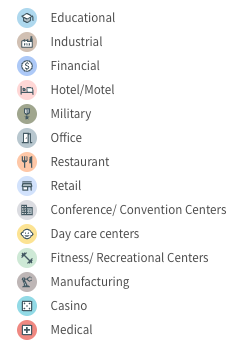

Layer Library List
The table below shows a brief overview of many of the layers in the layer library.
|
Title |
Description |
Source |
|
Buildings Footprints |
Building footprints shows an AI-generated building footprint aerial shot of every building. It can be layered with Parcels to see where there may be room in the parcel to expand. |
Bing |
|
Signal Brands |
This layer tracks key brands such as grocery stores, banks, and food chains that shape local economies and demographics. It offers insights into the concentration of influential businesses within a region. Users can leverage this data to understand market trends and neighborhood dynamics, aiding in competitive analysis and expansion planning. The information is crucial for making informed decisions based on local economic signals. |
Google Maps |
|
Military Installations |
This tracks military bases from all major military branches throughout the country as provided from the Census Bureau. |
Census Bureau |
|
Colleges and Universities Campuses |
College and Universities Campuses shows the land area for postsecondary institutions. This is helpful when analyzing potential need for storage because you get a relative sense of scale (the physical size of the institution) as well as layout. You can overlay this with satellite, street view, and even traffic counts to understand traffic patterns and access to the facility for that institutions students and faculty. |
Homeland Infrastructure Foundation-Level Data |
|
Supplemental Colleges |
The Supplemental Colleges layer shows simple pins for each postsecondary institution. This can be useful if you’d like a higher-level view than the Colleges and Universities Campuses layer which requires you to be more zoomed in on the map. |
Homeland Infrastructure Foundation-Level Data |
|
Nursing Homes |
Nursing Homes places pins to show locations of each nursing home across the country. This can be a helpful factor when assessing population age distribution. |
Homeland Infrastructure Foundation-Level Data |
|
Child Care Centers |
Child Care Centers shows pins of child care facilities across the country. |
Homeland Infrastructure Foundation-Level Data |
|
School Digger |
School digger publishes a guide to show the relative quality of school districts across the country. Their data includes 136,000 public and private schools across the US, featuring enrollment data, test scores, financial statistics. This layer will show you what type of school it is and if you click on each pin, it will also show you the schools rank and how many stars it received. |
School Digger |
|
Low Poverty Index |
The Low Poverty Index captures the depth and intensity of poverty in a given neighborhood. The index uses both family poverty rates and public assistance receipt, in the form of cash-welfare, such as Temporary Assistance for Needy Families (TANF). The index combines the family poverty rate and the percentage of households receiving public assistance. The resulting values range from 0 to 100. The higher the score, the less exposure to poverty in a neighborhood. |
US Department of Housing and Urban Development |
|
Urgent Care Facilities |
Urgent care is defined as the delivery of ambulatory medical care outside of a hospital emergency department on a walk-in basis and without a scheduled appointment. The Urgent Care dataset consists of any location that is capable of providing emergency medical care and must provide emergency medical treatment beyond what can normally be provided by an EMS unit, be able to perform surgery, or provide recuperative care beyond what is normally provided by a doctor's office. In times of emergency, the facility must be able to accept patients from the general population or from a significant subset of the general population (e.g., children). |
Homeland Infrastructure Foundation-Level Data |
|
Hospitals |
Hospitals shows a pin of each hospital across the country and, when clicked on, the specific type of hospital including the following categories (children, chronic disease, critical access, general acute care, long term care, military, psychiatric, rehabilitation, special, and women). The layer does not contain nursing homes or health centers. |
Homeland Infrastructure Foundation-Level Data |
|
Sea Level Rise |
Sea Level Rise highlights areas that could be impacted by rising ocean levels over time. The layer shows low-lying coastal zones that are most likely to flood as sea levels increase, based on elevation and tidal data. It’s meant as a screening tool to understand long-term risk, not a short-term flood forecast. This layer helps you see which areas may be more vulnerable to future coastal flooding and impacted as sea levels continue to rise. |
National Oceanic and Atmospheric Administration |
|
Wildfire Potential |
Wildfire Potential shows where wildfires are more likely to occur and be difficult to control, based on factors like vegetation, terrain, and historical fire data. Areas are categorized from very low to very high potential. This was sourced from USDA Forest Service. This layer doesn’t predict specific fires or seasons—it’s meant to help you understand long-term wildfire risk across large landscapes and make more informed decisions about development, safety, and investment in fire-prone regions. |
USDA Forest Service |
|
Seismic Hazard |
Seismic Hazard shows areas in the U.S. that are more likely to experience strong ground shaking from earthquakes. The map is based on geological models and historical data and reflects the probability of significant ground movement over a 50-year period. This layer helps you understand where earthquake risk is higher, making it useful for long-term planning, development decisions, and risk assessment. |
US Geological Survey |
|
Opportunity zones |
Opportunity Zones highlight areas across the U.S. that are eligible for tax incentives when investors make long-term investments in them. These zones were created in 2017 to encourage development and job creation in economically distressed communities. Adding this layer to your map helps you identify neighborhoods where investment may come with significant tax advantages, making it useful for targeting high-impact, high-upside opportunities. |
Community Development Financial Institutions Fund |