
Featured Update: Building a Custom Buy Box within TractIQ
TractIQ has over $500MM in live self-storage deals so it can be a lot to find the right ones for you. We’ve added a way for you to build a buybox and help the best deals surface to the top (and create inbound deal flow for you).
How it Works For Buyers
Customize your buy box by your acquisition criteria. States, price range, cap rate, unit count, occupancy, year built, demographics in the trade area and whatever else is you care most about. From there, every listing in the Marketplace carries a fit score against your criteria, updated in real time as new deals hit the platform.
Sort by fit and the closest matches rise to the top. Click into a score and you'll see the criterion-by-criterion breakdown, so you know exactly what a deal hits and what it misses before you spend any real time on it. If it's worth a closer look, the broker's contact details are right there, and you can move straight into underwriting without bouncing between tabs.
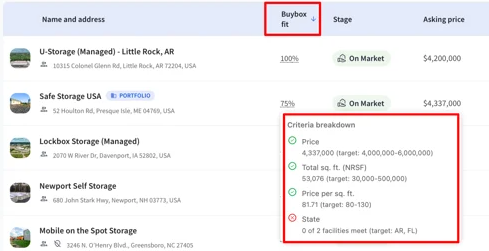
Brokers will also know when you’re a good fit for a deal they post based on your buybox so they can reach out and make sure you don’t miss a gem.
Getting set up
It takes about two minutes. Go to All Listings and click Create a Buy Box in the toolbar. If you'd rather understand it before you build one, the "?" chip in any Buy Box fit column opens a short explainer.
Log in and give it a go. We'd love to hear how y'all are putting it to work.
How it Works For Brokers
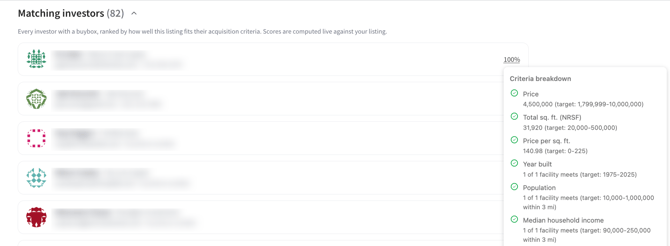
This is the part that changes your day. Publish a listing and you'll see a matching investor list attached to it, ranked by how closely each buy box lines up with your facility, with contact information included.
The buyers who have told the platform they want exactly this kind of asset are surfaced the moment your listing goes live, so your first round of calls goes to people already screening for it.
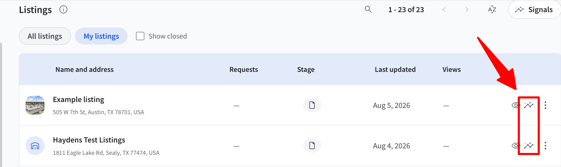
To see which investors will be excited about your deal, click into listing activity and understand the fit for each matching investor as soon as your deal is posted!
Private Listings
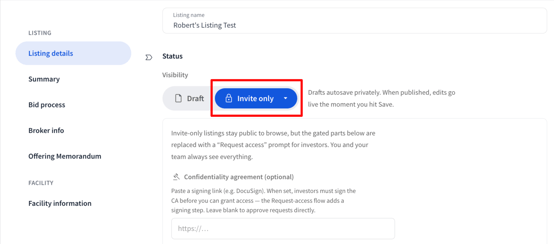
Brokers can now publish a listing privately, so a facility's on-market status stays hidden until you decide who sees it.
You control the exposure. Hide documents, hide location, or both (hiding location automatically locks documents too). Buyers submit a request for access, you approve or decline, and you can unlock a listing for one buyer at a time. You can also require a confidentiality agreement.
Restricted listings stay genuinely hidden for anyone without access, across the map, search and prospecting, exports, and saved deals. You also get engagement and request insights, so you can see who's circling before you grant anything.
This works well with the buybox above because as soon as a listing is privately listed, you can see the buybox fit for investors and figure out a proactive outreach strategy for the people who are most likely to buy your deal.
List a Facility Even If It's Not in TractIQ Yet
Add the basics (name, address, operating site or development site) and publish the listing immediately. Our team verifies the facility and attaches it behind the scenes, so nothing stalls your go to market.
We also moved the "Add new facility to TractIQ" option so it only appears after a search returns nearby facilities. That way you confirm the facility isn't already in the system before you add it.
Enchancements
Open a Listing Without Losing Your Place
Opening a listing from the insight panel now keeps you in context. If that listing is saved to one or more deals, a combo menu lets you open it in Listings or jump straight to a specific deal.
Maps: Redesigned (Beta) Pins
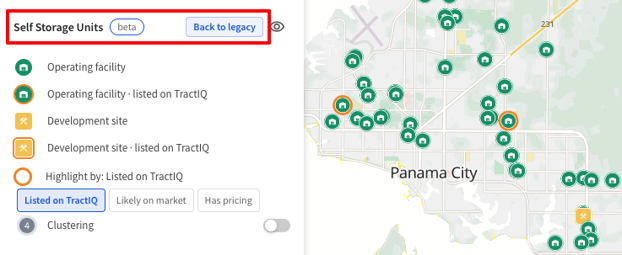
Operating sites now render as circles and development sites as squares, with pin color carrying a second dimension of your choosing listing status (listed on TractIQ, Likely On Market,or Whether the facility has pricing.
This is a really powerful way to understand which facilities are on the market and go deeper than you ever could before from within the map. By default, everyone is still on the legacy pins mode so you can check into
Account and Signup
New invited users are now asked for phone number, role (Broker, Investor, Operator, or Other), and title during signup. This way if you publish a buybox or a listing, other users can know who you are and how to get in touch.
New, Updated, and Removed Development Sites:
|
New Developments |
Updated Developments |
Removed Developments |
|
205 |
538 |
36 |
New, Updated, and Removed Facility Count:
|
New Facilities |
Updated Facilities |
Removed Facilities |
|
70 |
6,514 |
103 |
Bug Fixes
- Fixed: Filter and Sort dropdowns on the Deals table could open on top of each other. They now behave correctly and close on scroll.
- Fixed: The Buy Box criteria breakdown could open behind the insight panel, and on shorter screens the Buy Box editor pushed Save and Cancel below the fold.
- Fixed: You can now find and select an existing development site by address when creating a listing.
- Fixed: Logging back in after a session timeout no longer lands you on a broken page.
- Fixed: Backspace and delete were intermittently blocked in the Explore map's location search and in the Suggest Edits and report-missing-data inputs.
- Fixed: The insights panel now clearly distinguishes development sites from operating facilities in saved deal lists.
- Fixed: Executive Summary and Storage Site report rate averages now reconcile with the underlying rental comps.
- Fixed: Data now aligns correctly when you enter a decimal value for radius.