
Viewing Housing Developments on the Map
To see housing developments on your TractIQ map:
- Open your map and click the eye icon next to the Housing Developments layer.
- Developments will appear as circles on the map:
- Larger/darker circles = bigger projects
- Smaller/lighter circles = smaller projects
- Larger/darker circles = bigger projects
- Click on any circle to view project details, including:
- Project stage (e.g., conceptual, under construction)
- Cost
- Number of units
- Square footage
- Developer information
- Project stage (e.g., conceptual, under construction)
- For more details, click More Info to expand into the Insight Panel and view the full project description.
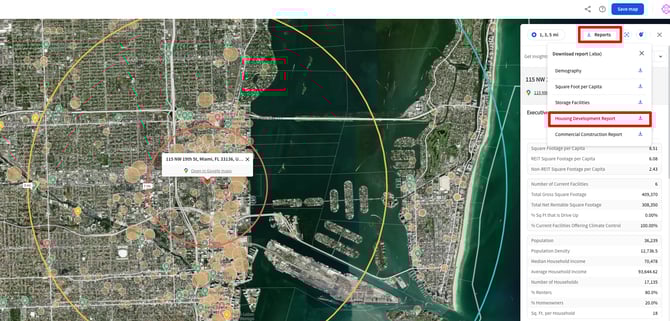
Generating the Housing Development Report
If you want a complete overview for a trade area:
- Select your point of origin (e.g., select a storage facility pin or drop a pin on the map).
- Choose your radius rings or drive time.
- From the Reports menu, select Housing Development Report.
The report will include:
- Project name & description – What’s being built and where.
- Number of units – Helps you quickly assess scale and demand.
- Project cost – Total investment coming into the area.
- Project stage – Conceptual, planning, under construction, or completed.
- Building use – Residential type (e.g., multifamily, mixed-use).
- Start date & last updated date – Track recency of updates.
- Owner information – Name, email, and phone (when available).
Why It Matters
The Housing Development Report helps you:
- Forecast demand based on population growth and increase in residential inventory.
- Understand market momentum by analyzing cost and scale of developments.
- Identify opportunities by seeing which neighborhoods are attracting new projects.
- Connect with developers using included owner and contact info.