
Featured Update:
Filter Dashboard Columns
A popular request was to be able to build a prospect list based on the trade area information like population in the 1/3/5 mile, square foot per capita or pricing trends. We've added the ability to do just that so that you can filter or sort from your prospect list and focus on the most promising deals!
View Your Deals Directly on the Map
Ever want to visualize all of your saved deals in a Prospecting List on the Map? Do your analysis there? Now you can take your Prospecting List into the Map, dig deep with all of the context of satellite imagery, the surrounding competition, and powerful Map background visualizations!
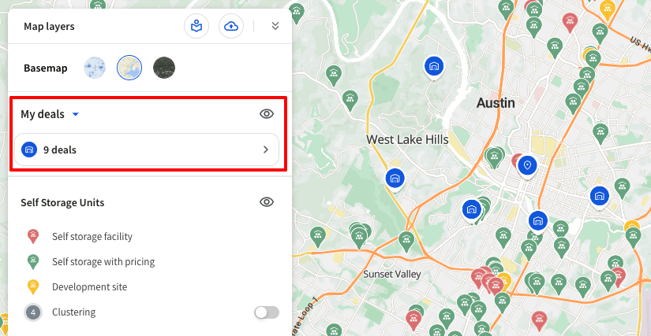
Expanded DealList Limits
Additionally, one of the biggest pieces of feedback you’ve given us is that you want to build longer prospecting lists. In response, we’ve increased list capacity to 300 deals for Pro users and 450 deals for Pro+ users.
- Starter: 150 deals
- Pro: 300 deals
- Pro+: 450 deals
Don’t hesitate to reach out by replying to this email if you’d like to switch plans and increase your prospecting power! We also have a couple of prospecting features in beta to help filter and sort based on deal characteristics and are happy to provide early access upon request.
Updated Onboarding Experience for New Users
We made several improvements to the onboarding flow to help new users get up and running faster.
Enhancements include:
- Improved onboarding modal styling and interactive elements
- Clear actions to invite team members (when seats are available)
- Quick access to prospecting tools, site analysis, and onboarding resources
Inline Support Access
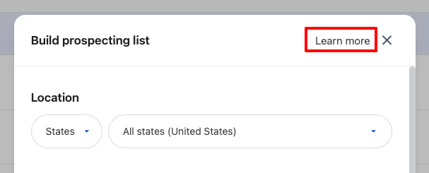
We have begun adding direct links into relevant Help Center articles throughout the application so that if you're ever confused about how to use a feature or what a data set means, you can access information instantly without breaking context or searching for the right article. We started with direct links in Prospecting and the Deal Dashboard and plan to follow up with more data help articles in the insight panel. Just click “Learn More” anywhere you see it to get to the help center.
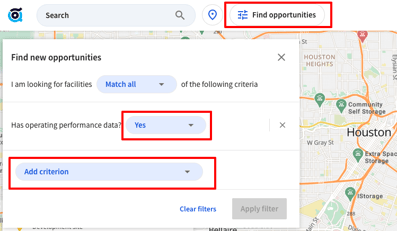
Operating Performance Facility Filtering
To make it really easy for you to identify which facilities have operating data, we added a filter to show which facilities have occupancy and financial statements available directly in the map.
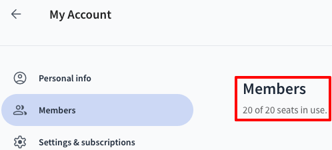
Admin and user management
- We’ve made it easier for admins to manage users by clarifying the number of seats in use.
Expanded Operating Performance
Operating Performance data (e.g. Occupancy and Financial Statements) coverage has been expanded to include historical data back to 2018, with nearly 3,500 facilities now included.
Demographics & Market Data
Routine data refreshes and improvements continue across TractIQ datasets, including updates to development site and facility datasets to maintain accuracy and completeness.
Housing Development Data Clearout
We’ve removed over 15,000 housing developments that were completed, likely cancelled, or deemed duplicates. We are tracking over 64,000 housing developments from stages conceptual through Certified Occupancy.
New, Updated, and Removed Development Sites:
|
New Developments |
Updated Developments |
Removed Developments |
|
11 |
1114 |
97 |
New, Updated, and Removed Facility Count:
|
New Facilities |
Updated Facilities |
Removed Facilities |
|
310 |
2663 |
14 |
Bug Fixes
This release also includes several bug fixes and performance improvements:
- Fixed legend scrolling issues when long legend lists extended off screen
- Fixed map zoom controls being hidden behind the Insight Panel
- Fixed an issue where editing deals in the map could cause deal counts to fall out of sync
- Fixed visual overlap between scrollbars and results panels
- Fixed radius selection behavior when reopening analysis areas
- Fixed encoding issues causing special characters in facility names
- Improved feedback and loading indicators when saving deals or adding facilities to lists
- Fixed list creation errors when titles were left blank
- Fixed an issue where exporting pricing data produced corrupted files
We’re Hiring
TractIQ is growing!
If you know someone who would be a great fit for our Investment Solutions Executive or Investor Relations Manager roles, please send them to our careers page or have them reach out directly.