
The Executive Summary in TractIQ provides a fast, professional, and shareable overview of any site, address, or market in the United States. It’s designed to help you quickly understand market fundamentals, supply and demand dynamics, and key demographics — all in one place.
This article walks through how to access the Executive Summary, what data it includes, and how to export it as a ready-made Site Report.
How to Access the Executive Summary
To open the Executive Summary, you first need to select a point of origin on the map. You can do this in several ways:
- Click on an existing self-storage facility pin
- Search for an address or location using the search bar
- Drop a custom pin anywhere on the map
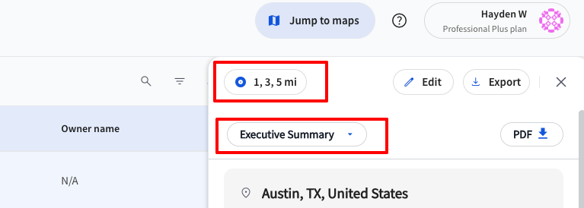
Once a point of origin is selected, the Insight panel will open on the right-hand side of the screen. From there, select "Executive Summary" in the dropdown menu to access.
Trade Area Selection
Within the Executive Summary panel, you can choose different trade area radii or drive times (for example, 1-, 3-, and 5-mile rings).
When you update the trade area:
- The Executive Summary refreshes automatically
- Data is recalculated and displayed for each selected radius
- You can toggle between trade areas directly within the panel
Viewing the Executive Summary as a Standalone Page
If you’d prefer to view all trade areas at once without switching tabs, you can open the Executive Summary as its own page.
To do this:
- Click Analyze Deal

This opens a standalone Executive Summary page where you can view multiple trade areas side by side, along with all supporting data beneath each section.
What’s Included in the Executive Summary
The Executive Summary provides a high-level snapshot of the market, including:
Storage Supply Overview
- Square feet per capita (broken out by REIT and non-REIT)
- Total number of storage facilities
- Total gross rentable square footage in the market
- Note about square foot per capita:
-
- Development sites are never included in current square footage or Square foot per capita reporting
- Development sites are included in both the count of "new facilities in development" and the "projected square footage" unless the project stage is "cancelled"
-
Demographics
- Total population
- Population density
- Median household income
- Number of households
- Percentage of renters vs. homeowners
Supply & Demand Pipeline
- Future storage supply index
- Incoming development pipeline (when applicable)
- Visibility into upcoming facilities in the market
Growth Projections
- Population growth projections (percentage-based)
- Projected square feet per capita
- Projections based on census data and tracked housing developments within TractIQ
Market Rate Insights
- Average market rent per square foot
- Rates broken out by unit size
- Climate-controlled vs. non-climate-controlled units
Exporting the Executive Summary Site Report (PDF)
If you want all of this information preloaded into a polished, shareable format, you can export the Executive Summary Site Report.
To export:
- Click the PDF button within the Executive Summary
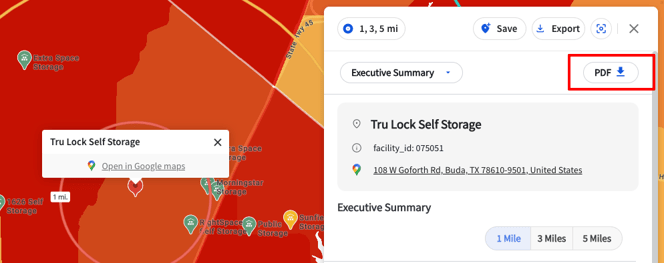
This generates a ready-made report that’s ideal for sharing with:
- Investors
- Lenders and financial institutions
- Business partners
- Internal teams
What’s Included in the PDF Site Report
The exported Site Report includes both Executive Summary data and map-level context, such as:
- A map view with your selected pin and trade area rings
- Storage supply bubbles and housing indicators
- Storage supply totals and demographic breakdowns
- Traffic volume data
- Market rate trends by facility
- Details on nearby storage facilities
- Housing development activity within the trade area
This report is designed to help you walk into conversations prepared with a clear, data-backed site overview.
Pro Tip: Use multiple trade areas (e.g., 1-, 3-, and 5-mile radius, or 5-, 10-, and 15-minute drive times) to compare results and see a more complete picture of your market.
Need Help?
If you have questions about the Executive Summary, Site Reports, or how to use this data in your workflow, our team is here to help.
Reach out anytime through Support — we’re happy to assist.