
Overview
Live on-market listings are now available directly in TractIQ. The platform you already use to underwrite and prospect for storage deals now includes active listings from brokers across the self-storage industry, all in one place.
To make your deal search even more precise, we've added a Buy Box Fit Score. Create a buy box with your acquisition criteria, and every on-market facility gets scored against it automatically. No more scanning listing after listing to see what fits. Your best matches rise to the top.
Getting Started
To create your buy box:
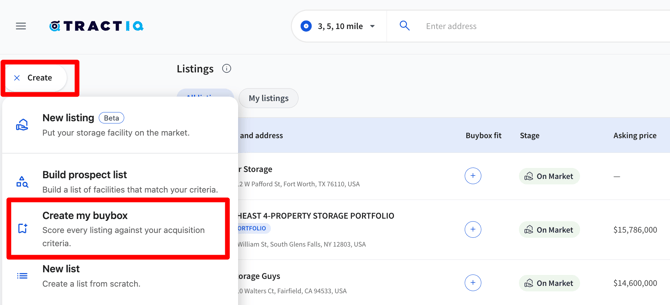
- Click the Create button on the left-hand side of the platform
- Select Create My Buy Box
This opens a list builder similar to the prospecting list experience, where you can set your acquisition criteria.
Setting Your Acquisition Criteria
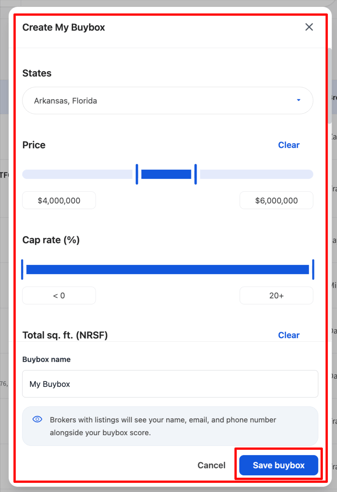
Your buy box supports a wide range of criteria, so you can be as broad or as targeted as you like:
- Location: Select the states you're actively acquiring in
- Asking price: Set a price range that matches your budget
- Cap rate
- Total net rentable square footage
- Price per square foot
- Occupancy
- Year built and number of units: Brokers often include these details on the listing itself, so you can set criteria against them too
- Median household income and population: When you enter a value here, you can also select a radius to define the trade area demographic
- Investment strategy
- Management type
You don't need to fill in every field. Leave any criteria blank that don't factor into your acquisition decisions, and the score will be based on what matters to you.
Once your criteria are set, give your buy box a name and click Save.
Sorting Listings by Fit
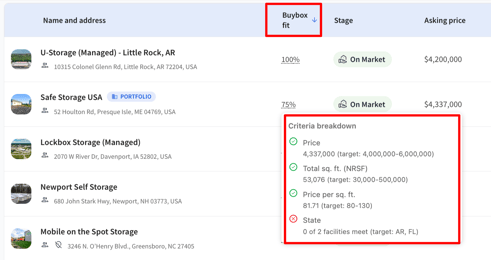
With your buy box saved, every deal in the Listings Marketplace now shows a Buy Box Fit percentage. You can sort listings by asking price, broker, or stage as usual, but now you can also sort by Buy Box Fit to bring your strongest matches straight to the top.
Click on any fit score to open the criteria breakdown. You'll see exactly which of your criteria the listing matches, whether that's price, net rentable square footage, price per square foot, state, investment strategy, or anything else you've set.
From Fit Score to Underwriting
When a listing looks promising, click into the facility to view the investment highlights and property details the broker has provided, including how many days the listing has been on the market.
From there, select View Insights to open the insight panel and start your underwriting right where you found the deal. Your criteria, the listing, and your analysis all live in one workflow.
Brokers Can See Your Fit Score Too
One more thing worth knowing: brokers on a deal can see your fit score. If you're a strong match for a listing they're working on, they may reach out directly to explore mutual fit. Your buy box isn't just a filter, it's a signal to the market that you're a serious buyer for the right deal.
Tip: Keep your buy box current. As your acquisition strategy shifts, update your criteria so your fit scores (and the brokers watching them) reflect what you're actually looking to buy today.
Questions?
We'd love to hear how you're using on-market listings and your Buy Box Fit Score. If you have questions or feedback, reach out to us anytime at support@tractiq.com. We're here to help.